|
View the web version

Hi there, hope you're having a great Friday!
This is Colm and Simon from CommerceGurus, with a handpicked weekly roundup of eCommerce articles.
This updated Shopify guide looks at one of the most important parts of an eCommerce homepage: the hero section.
It covers different approaches including full-screen photography, static images with text, carousels, video backgrounds and animation, with examples from brands such as Glossier, Allbirds, Mejuri and Kylie Cosmetics.
There are plenty of practical recommendations: use high-quality imagery, keep the headline and CTA easy to read, optimise images carefully for loading speed, and consider creating a separate vertical image for mobile rather than relying on the desktop image being automatically cropped.
The guide also recommends A/B testing different hero images and monitoring CTA click-through rate, scroll depth, bounce rate and page load time to see which approach actually performs best.
Take a Look at Hero Images: Best Practices and Examples (2026)
🎉 Introducing CommerceGurus Turbo!
One plugin. One click. CommerceGurus Turbo is the only performance plugin built purely for WooCommerce stores.
Includes page and edge caching, CSS and JS optimization, lazy loading, Cloudflare image optimization, and preloading — all with safe defaults that work immediately.
Discover CommerceGurus Turbo
|
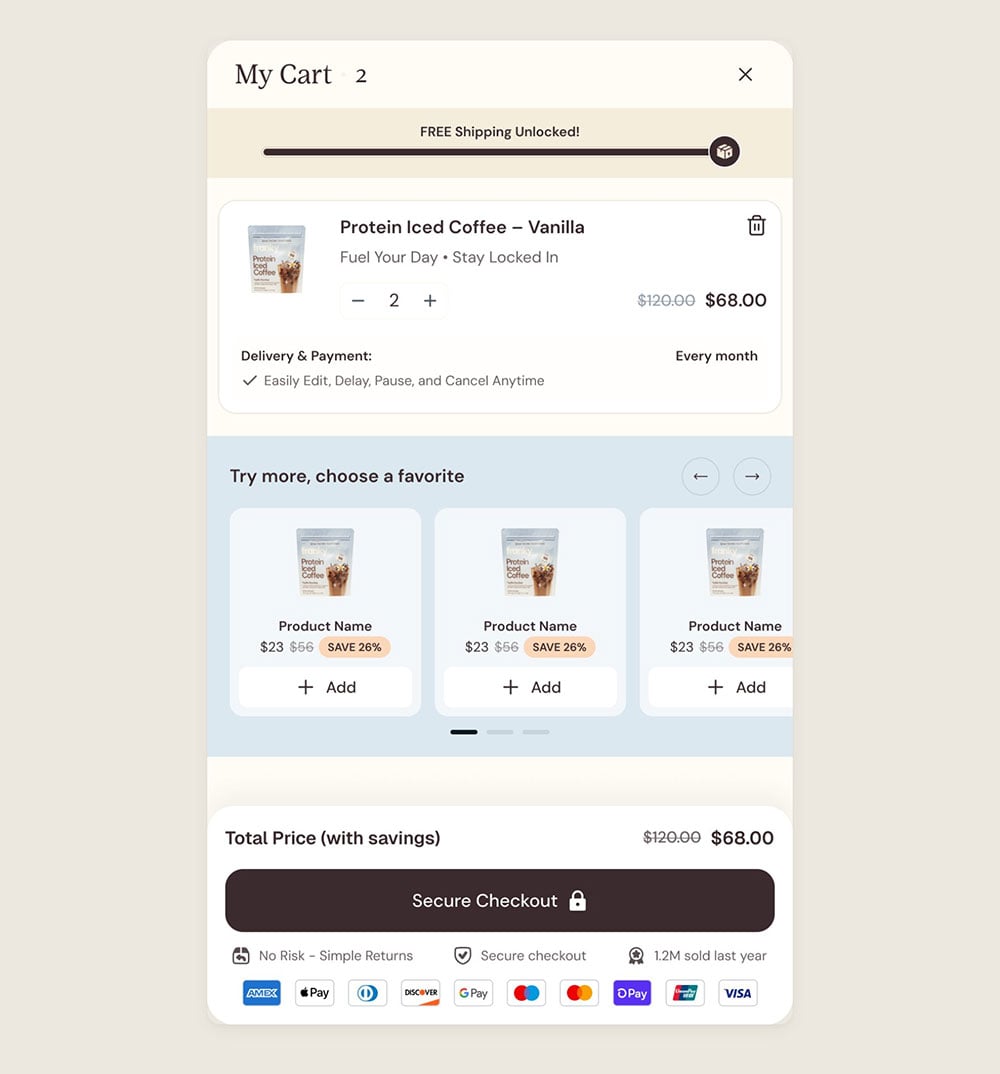
Kasper Dolk makes a good point about an often underused part of the eCommerce experience: the cart shouldn't simply be a list of products. It's also an opportunity to increase AOV and deal with any last-minute objections before checkout.
He recommends adding a free shipping progress bar, clearly highlighting savings, displaying trust signals near the checkout button, and offering relevant one-click upsells.
The important word is relevant - complementary products or more of something already in the cart at a discount tend to work better than introducing an entirely different product that needs explaining.
This is something you can already do with our CommerceKit plugin.
The Order Bumps module lets you add targeted upsells to the cart, while Free Shipping Notifications shows customers how much more they need to spend to qualify for free shipping.
How to Make Your Sidebar Cart Work Harder
Ankit Minocha from The Agentic Operator looks at an important change in eCommerce discovery: your product pages can be perfectly optimised for human shoppers and traditional search, yet still be difficult for AI shopping agents to understand and recommend.
The problem is that agents don't necessarily interpret a PDP in the same way a person does.
Important details might be buried in descriptions, images, accordions, or marketing copy, while an AI agent may be looking for clearly structured attributes such as material, colour, size, price, availability, ratings, or other category-specific characteristics.
If that information isn't represented cleanly in the underlying product data, your products may be excluded from otherwise relevant recommendations.
Read About Why Your Product Pages May be Invisible to Agents
This excellent interactive guide explains how to make sense of the Chrome DevTools Performance panel, particularly the two areas that matter most: the network waterfall and flame chart.
Rather than just describing the different charts, it uses interactive examples and a real performance capture to show what different patterns actually mean.
It covers how to distinguish between CPU and network bottlenecks, identify long JavaScript tasks, diagnose LCP and INP problems, spot layout shifts and forced reflows, and trace slow requests back to what initiated them.
There's also a useful section on recognising common third-party scripts such as analytics, consent tools, A/B testing platforms, chat widgets and payment providers inside a trace.
If you've ever opened the Performance panel, looked at the mass of coloured bars and not known where to start, this is a very useful guide to bookmark.
Learn How to Read a Performance Profile
This cool interactive visualisation turns 1,300 product categories into a solar system.
Large planets represent the main categories, with smaller connected planets representing subcategories, and each is linked to millions of products and product videos.
You can resize the planets based on total video views, engagement rate, or growth since tracking began, search for individual categories, and compare two categories side by side.
Check out WinProducts
Our WordPress Products:
Our Shopify Apps:
That's it for this edition. Simply reply to this email if you have any questions or suggestions, we read every message.
You can also take a look at our entire back catalog of newsletters.
Have a great week and best of luck with your projects!
Simon and Colm from CommerceGurus
|