|
View the web version

Hi there, hope you're having a great Friday!
This is Colm and Simon from CommerceGurus, with a handpicked weekly roundup of eCommerce articles.
We've spent years optimizing WooCommerce stores for 60,000+ Shoptimizer customers.
Every speed trick, every fix for cached checkout pages breaking orders, every workaround for plugins that conflict with each other - we've seen it all!
So we bottled all of our performance knowledge into one plugin.
CommerceGurus Turbo is 7 performance modules in a single plugin: page caching, edge caching, CSS and JS optimization, lazy loading, image optimization, and preloading - all built specifically for WooCommerce with safe defaults that work the moment you activate.
No configuration. No juggling five different plugins. No cached checkout pages silently killing your conversions.
One click to connect your free Cloudflare account and your store starts serving pages in single-digit milliseconds from 300+ edge locations worldwide.
See the live PageSpeed scores for the main site and the demo, both running CommerceGurus Turbo.
Sign up for our waitlist and you can be one of the first to get your hands on it!
Discover CommerceGurus Turbo
🎉 New Shopify App: Cart Upsells!
We're looking for Shopify merchants and agencies to test our new CommerceGurus Cart Upsells app and provide valuable feedback. In exchange for your insights, you'll receive a free lifetime license!
Submit your interest!
|
Microsoft Clarity has introduced Brand Agents - AI-powered assistants that sit on your website and act more like a digital sales rep than a traditional chatbot.
Instead of just answering basic questions, they can guide shoppers, recommend products, and help move people toward checkout through a more natural, conversational experience.
What’s interesting here is that these agents tap into your product data, brand voice, and real user behaviour from Clarity.
That means they’re not just reactive, they can adapt to how people actually browse your store and help surface the right products at the right time.
It’s another step toward turning eCommerce stores from static pages into more interactive, personalized shopping experiences.
Take a Look at Microsoft Clarity: Brand Agents
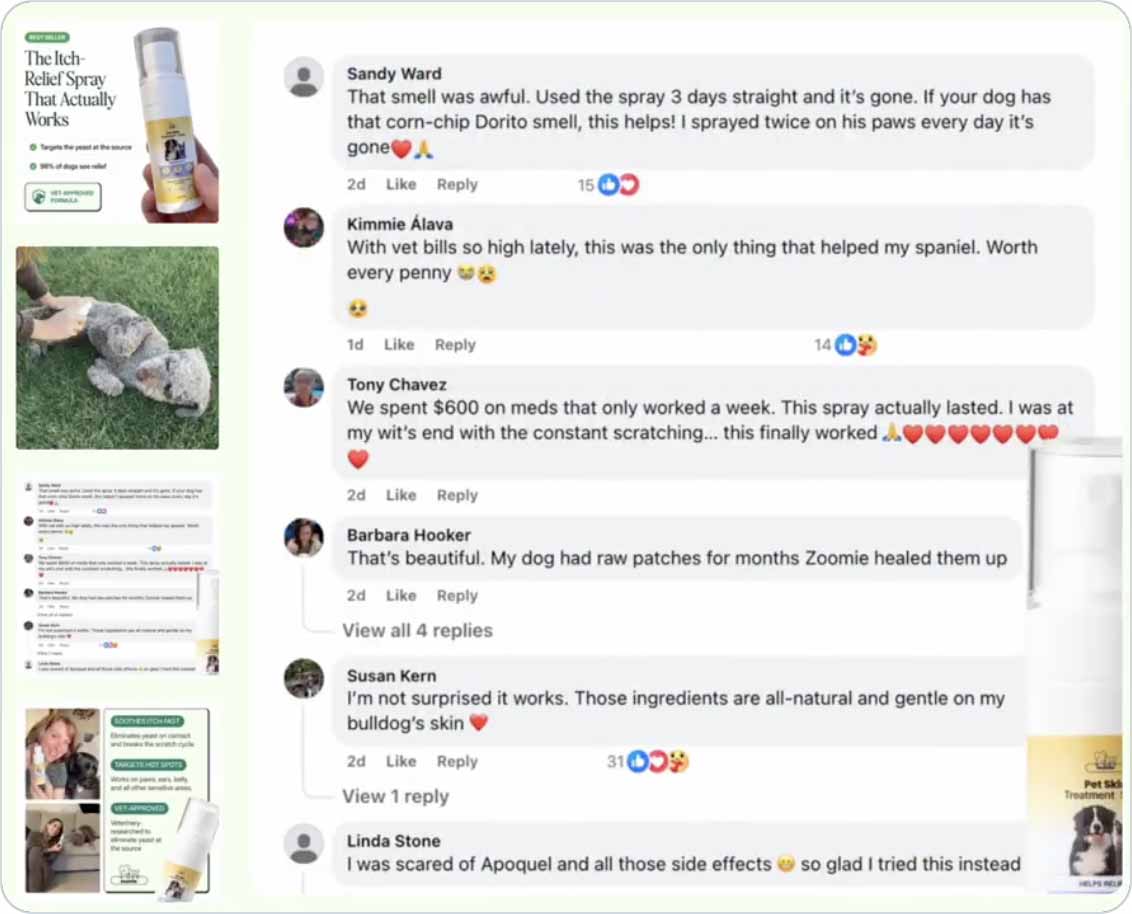
This is a great example of using your product page gallery in an efficient way with each image focused on conversions.
- The first image shows the product itself with accurate sizing in someone's hand. You see key selling points and language e.g. "98% of dogs see relief" and "vet-approved formula"
- The second image is a real photo of applying the spray to a dog - the "how".
- Facebook comments in the third screenshot showcase real reactions from users.
- Subsequent images highlight happy owners (with happier dogs after the treatment) and a 30-day money back guarantee promise to help seal the deal.
Take a Look at an Optimised PDP Image Carousel for a Pet Brand
In this article, Vitaly Friedman from Smashing Magazine breaks down when to use a modal vs a separate page.
The key idea is that both options introduce friction, so choosing the right one comes down to how much interruption the user can tolerate without breaking their flow.
Modals work best for quick, focused, self-contained actions such as confirmations or small edits because they let users stay in context and return to where they were.
But they can also be disruptive, especially when users need to compare information, copy data, or complete longer tasks.
For anything more complex, a full page is usually the better choice, as it gives users space to focus and navigate more freely.
Read Modal vs. Separate Page: UX Decision Tree
Adam Wathan (the creator of Tailwind CSS) recently demoed his new product ui.sh, an AI-powered toolkit for building and designing front-end interfaces.
The idea is simple but powerful: instead of needing to clearly define a design upfront, you can ask the AI to generate multiple UI options for you - much like you would when working with a designer.
In the demo, Adam asks for a testimonial section to be added to a landing page, and the AI produces several different design variations that he can preview directly in the browser.
From there, the workflow becomes incredibly fast and intuitive.
You can scroll through the options, pick the one you like, and instantly apply it to your page, with the AI handling the implementation and cleanup. The result is a more exploratory way of designing, where you don’t need perfect ideas upfront.
Take a look at the ui.sh Quick Demo
Our WordPress Products:
Our Shopify Apps:
That's it for this edition. Simply reply to this email if you have any questions or suggestions, we read every message.
You can also take a look at our entire back catalog of newsletters.
Have a great week and best of luck with your projects!
Simon and Colm from CommerceGurus

|